 English
  简体中文
简体中文  Deutsch
  Español
  Français
  Italiano
  日本語
日本語  한국어
한국어  Polski
  Português
  Русский
  Türkçe
  Nederlands
  ไทย
ไทย  Tiếng Việt
An office lighting design guide explains how luminaires, daylight, controls, furniture layouts, and ceiling services should work together in a commercial workplace. For workstations, meeting rooms, collaboration areas, circulation routes, and lounges, the design must convert visual tasks and viewing directions into measurable requirements for illuminance, uniformity, glare control, colour rendering, and user control. Where lighting and acoustic requirements overlap, acoustic lighting can combine a luminaire with a sound-absorbing panel, baffle, cloud, or shade to support coordinated ceiling design.
Key Takeaways
1. Design around real tasks. Position office lighting according to desks, monitors, meeting tables, circulation routes, and viewing directions rather than applying a uniform ceiling grid.
2. Evaluate the complete visual environment. Verify maintained illuminance, uniformity, UGR, screen reflections, daylight response, colour rendering, and lighting controls together.
3. Coordinate the ceiling early. Align luminaires and acoustic elements with HVAC diffusers, sprinklers, sensors, speakers, suspension points, maintenance access, and the reflected ceiling plan.
What Makes Office Lighting Different From General Commercial Lighting?
An office lighting design guide must address long-duration visual tasks rather than simply make a commercial interior appear bright. Employees repeatedly shift their view between monitors, documents, keyboards, windows, colleagues, and presentation surfaces, so office lighting must control direct glare, screen reflections, task illuminance, surface brightness, and visual contrast throughout the working day.
Furniture geometry also determines where office lighting must perform. Desk orientation, monitor position, meeting tables, partitions, seating arrangements, and circulation routes define the actual task areas and viewing directions. Luminaire positions should therefore follow occupied work zones rather than rely exclusively on an evenly spaced ceiling grid.
Why Do Modern Offices Need Multiple Lighting Zones?
Modern offices need multiple lighting zones because focused work, meetings, collaboration, circulation, and social activities have different visual and control requirements. A single luminaire type, output level, or control setting cannot support every office activity equally well.
| Office zone | Primary activity | Lighting priority | Recommended control |
| Focus workstations | Reading, typing and screen work | Task illuminance, low glare and limited screen reflections | Separate perimeter and interior control zones |
| Meeting rooms | Discussion, presentations and video calls | Table illumination, facial illumination and display visibility | Dimming and scene control |
| Collaboration areas | Informal discussion and shared work | Flexible distribution and vertical brightness | Local or activity-based control |
| Circulation routes | Movement and wayfinding | Safe visibility and clear visual transitions | Occupancy-based control |
| Lounges and social areas | Informal meetings and relaxation | Layered lighting and comfortable surface brightness | Dimming or scheduled scenes |
| Daylight perimeter zones | Regular work near windows | Stable task illumination as daylight changes | Daylight-responsive dimming |
Office lighting zoning connects each workplace activity with the appropriate light distribution, glare control, daylight response, and control strategy. Designers can further examine how different office zones can be designed for both focus and collaboration.
Why Should Office Lighting Design Start With the Office Layout Rather Than the Fixture Catalog?
How Should Office Lighting Follow Workstation Rows?
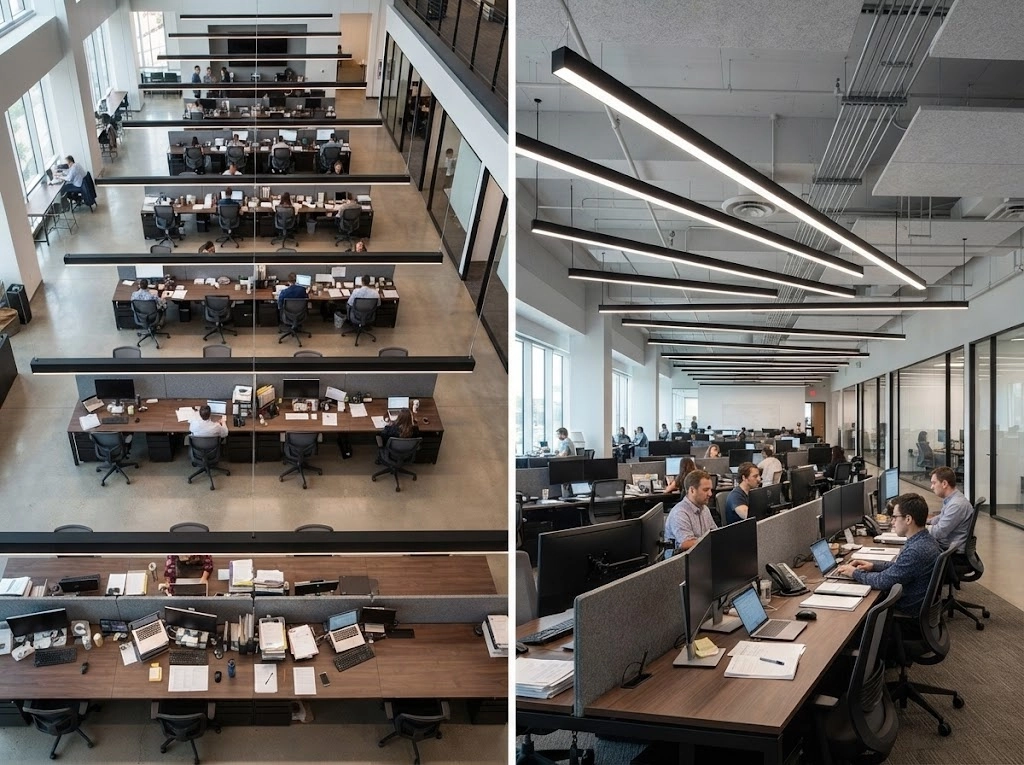
Workstation geometry should determine the position and orientation of office luminaires. Desk rows, monitor directions, partition heights, and seating positions define the actual visual task.
Designers should coordinate:
· Luminaire alignment with continuous workstation rows
· Light distribution across keyboards, documents, and shared desk surfaces
· Fixture positions outside critical monitor-reflection angles
· Separate control zones for perimeter and interior workstations
A coordinated workstation layout produces more useful task illumination than a generic ceiling grid based only on equal fixture spacing.
How Should Office Lighting Relate to Meeting Tables?
Meeting-room lighting should support documents, faces, screens, cameras, and presentations within the same space. A single downlight pattern rarely addresses every meeting activity equally well.
The lighting plan should consider:
· Horizontal illumination across the meeting table
· Vertical illumination on participants’ faces
· Luminaire positions relative to displays and cameras
· Dimming or scene control for presentations and video calls
Meeting-table geometry provides the correct reference for fixture placement, while control scenes allow the room to support different communication formats.
What Lighting Strategy Works for Office Collaboration Areas?

Collaboration areas need flexible lighting for short discussions, shared documents, portable screens, and changing furniture arrangements. The lighting distribution should support movement without creating an excessively bright visual field.
Useful design responses include:
· Broad, balanced illumination for flexible seating
· Local controls for scheduled and informal activities
· Vertical brightness around writable and presentation surfaces
· Fixture placement that preserves future furniture flexibility
Collaboration lighting should define the activity zone while allowing the workspace to adapt to changing team requirements.
How Should Lighting Support Office Lounge and Social Areas?
Office lounge lighting should create a clear visual transition from task-focused work areas without sacrificing visibility or circulation safety. Decorative luminaires may contribute to the atmosphere, but optical performance and control remain important.
Designers should review:
· Layered ambient, local, and decorative lighting
· Warmer or dimmable settings where the interior concept requires them
· Comfortable brightness around seating and coffee points
· Clear visual guidance between lounge and circulation areas
Lounge and social lighting should reinforce the intended atmosphere while remaining coordinated with adjacent work zones and the wider office control strategy.
Illuminance — How Much Light Does an Office Actually Need?
Illuminance depends on the task, not on the office label. EN 12464-1:2021 specifies a maintained illuminance of 500 lx for writing, typing, reading, data processing, and CAD workstation tasks. Detailed technical drawing by hand requires 750 lx because the visual task demands finer detail and sustained concentration.
Average lux is not the whole story. A compliant office lighting design must also verify uniformity, UGR, luminaire luminance, screen-reflected glare, colour rendering, wall and ceiling illuminance, daylight conditions, maintenance factors, and lighting controls. Average horizontal illuminance cannot describe the complete visual environment.
How Should Designers Use Photometric Calculations Instead of Fixture Counts?
Photometric calculations should determine office lighting performance before the project team fixes the luminaire quantity. Fixture counts alone cannot account for beam distribution, mounting height, room reflectance, spacing, furniture position, daylight, or maintenance loss.
A practical calculation workflow should verify:
· Maintained illuminance on the relevant task area
· Uniformity across workstations, meeting tables, and circulation routes
· UGR limits and luminaire luminance for screen-based work
· Screen-reflected glare based on luminaire position and monitor orientation
· Vertical illuminance on faces, presentation walls, and whiteboards
· Daylight contribution at perimeter zones
· Maintenance factors and expected lumen depreciation
· Control responses for occupancy, daylight, dimming, and scene changes
Illuminance Reference for Office Zones (EN 12464-1:2021)
| Office zone or task | Maintained illuminance | UGR limit | Ra minimum | Design note |
| Screen-based office workstations: writing, typing, reading, data processing | 500 lx | UGR ≤ 19 | Ra ≥ 80 | Coordinate task illumination with glare control, screen reflections, and vertical illuminance. |
| CAD workstations | 500 lx | UGR ≤ 19 | Ra ≥ 80 | Use low-glare luminaires; do not raise ambient illuminance solely because the task uses screens. |
| Technical drawing or detailed drafting by hand | 750 lx | Project-specific | Project-specific | Use task lighting where suitable instead of raising the entire office ambient level. |
| Meeting and conference rooms | 500 lx | UGR ≤ 19 | Ra ≥ 80 | Provide dimming or scene control while retaining adequate facial and vertical illuminance. |
| Corridors and circulation areas | 100 lx | Project-specific | Project-specific | Check stairs, level changes, doors, and emergency-lighting requirements separately. |
Values shown are maintained illuminance targets from EN 12464-1:2021 and should not be interpreted as stand-alone design criteria. Final office lighting should also verify uniformity, UGR, luminaire luminance, screen-reflected glare, colour rendering, wall and ceiling illuminance, daylight conditions, maintenance factors, and lighting controls. EN 12464-1:2021 should be checked against the applicable national adoption and project requirements. For projects outside Europe, ANSI/IES RP-1-24 may provide a relevant comparison; German projects should also check DIN EN 12464-1.
Photometric calculations convert these requirements into a tested lighting arrangement. The final design should therefore use calculated performance data, not a nominal fixture count copied from a typical ceiling grid.
Visual Comfort and Glare Control for Screen-Based Work
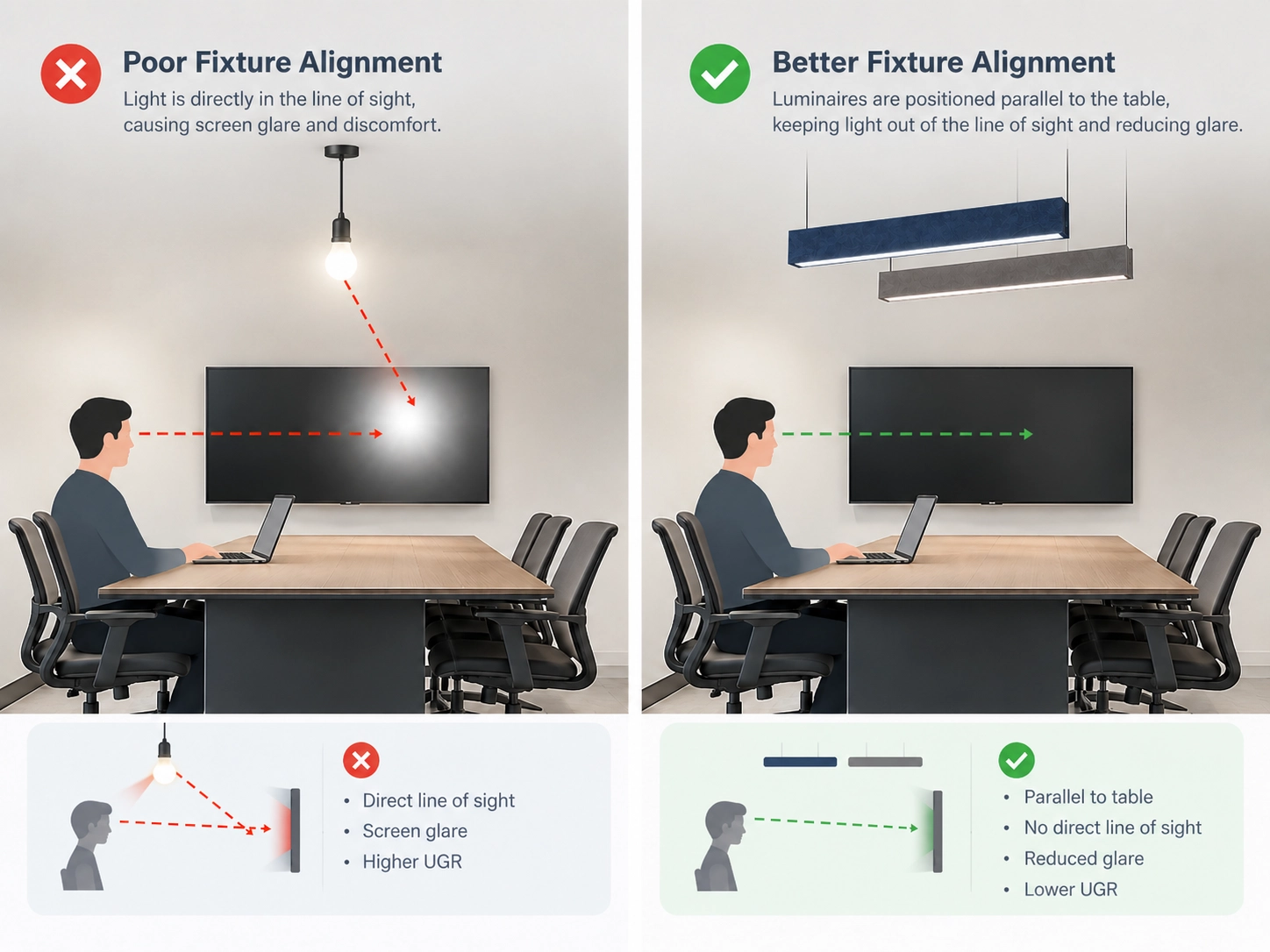
Office screens make glare a daily visual problem, not a minor fixture-selection issue. Employees look between monitors, documents, keyboards, windows, and colleagues for many hours. Bright luminaires, high-contrast surfaces, and uncontrolled daylight can create discomfort glare or reflected images that reduce screen legibility.
Luminaire position can matter as much as luminaire type in screen-based offices. A low-glare fixture may still produce disturbing reflections when the installation angle aligns with a monitor surface. Designers should check shielding, mounting position, screen orientation, window direction, and observer viewpoints within the actual workstation layout.
Visual comfort depends on controlled brightness and contrast, not maximum brightness alone. Increasing illuminance cannot correct a poorly positioned glare source or a bright window behind the display. A balanced office lighting design controls source luminance, surface reflectance, distribution, and screen reflections together.
How Does UGR Help Evaluate Glare in Office Lighting?
The Unified Glare Rating (UGR) is the CIE standardised metric for predicting discomfort glare from indoor lighting installations. UGR uses the luminance, apparent size, and position of each glare source relative to the observer’s line of sight, together with the room’s background luminance.
UGR is a logarithmic rating, not a percentage and not a direct measurement of illuminance. Lower UGR values indicate lower predicted discomfort glare. Under EN 12464-1:2021, typical screen-based office work, CAD workstations, and meeting rooms have a maximum UGR limit of UGR ≤ 19; technical drawing has a stricter limit of UGR ≤ 16.
Designers should verify:
· Luminaire position relative to monitor viewing directions
· Shielding and visible luminaire luminance
· Room geometry and ceiling height
· Wall, ceiling, floor, and workstation reflectances
· Window brightness and daylight direction
· Observer positions across the occupied work area
· Reflected glare on displays, separately from nominal UGR compliance
A catalogue UGR value is not a fixed result for every installation. The completed office must be assessed using the actual room geometry, luminaire arrangement, surface reflectances, observer positions, and screen orientations. UGR compliance does not guarantee that monitors will be free from reflected glare. Photometric review and a fixture-alignment study should therefore be completed together.
Which Office Lighting Distribution Is Best: Direct, Indirect, or Direct/Indirect?

When Is Direct Lighting Suitable for Office Workstations?
Direct lighting sends most luminous output downward toward desks and task surfaces. The distribution supports efficient task illumination and can work well across workstation rows when glare control, shielding, and fixture alignment are carefully coordinated.
Direct office lighting is suitable when designers need:
· Efficient delivery to horizontal work surfaces
· Predictable illuminance across workstation rows
· Compact recessed, surface-mounted, or linear office lighting layouts
· Controlled output for task-focused areas
The main limitation is glare risk. Direct luminaires should be positioned outside common monitor-reflection angles and selected with appropriate optical shielding.
When Does Indirect Lighting Improve Office Visual Comfort?
Indirect lighting directs light toward the ceiling or upper walls before the reflected light reaches the occupied space. The approach can create softer ceiling brightness and reduce the visual dominance of luminous apertures.
Indirect lighting works best when the project provides:
· Sufficient ceiling height and reflective surfaces
· Clean, reasonably uniform ceiling finishes
· A need for softer ambient illumination
· Lounge, reception, or visually calm workplace areas
Indirect distribution depends strongly on ceiling reflectance, geometry, and surface condition. A dark or obstructed ceiling can reduce efficiency and create uneven brightness.
Why Choose Direct/Indirect Suspended Lighting for Offices?
Direct/indirect suspended lighting combines downward task illumination with upward ceiling illumination. The configuration can balance workstation performance, ceiling brightness, and visual comfort in open offices and meeting rooms.
A suspended office pendant lighting system or pendant light for office application should be coordinated with:
· Suspension height above desks and meeting tables
· Direct and indirect output ratios
· Ceiling reflectance and service obstructions
· Monitor orientation and viewing direction
· Dimming and scene-control requirements
· Furniture changes across flexible workplace zones
Direct/indirect fixtures require more coordination than a simple direct fixture, but the combined distribution can support a more balanced ceiling and task environment.
Office Lighting Distribution Comparison
| Distribution | Strength | Limitation | Typical office use | Colour rendering guidance |
| Direct | Efficient task illumination | Higher glare risk if shielding or alignment is poor | Workstations and focused task areas | Ra ≥ 80 as the EN 12464-1:2021 baseline |
| Indirect | Soft ceiling brightness and reduced source dominance | Depends on ceiling reflectance and room geometry | Offices, lounges, reception areas | Ra ≥ 80 as the EN 12464-1:2021 baseline |
| Direct/Indirect | Balanced task and ambient illumination | Requires additional coordination and suspension planning | Open offices and meeting rooms | Ra ≥ 80 baseline; Ra ≥ 90 may be a project-specific target where presentation quality or material appearance matters |
EN 12464-1:2021 establishes Ra ≥ 80 as the ordinary office baseline; Ra ≥ 90 is not a universal requirement. Higher colour rendering should be specified as a project-specific target where colour discrimination, material selection, presentation, or facial appearance is especially important. CRI should also be supplemented with TM-30 metrics when colour quality is critical.
How Should Daylight and Electric Lighting Work as One Office Lighting System?
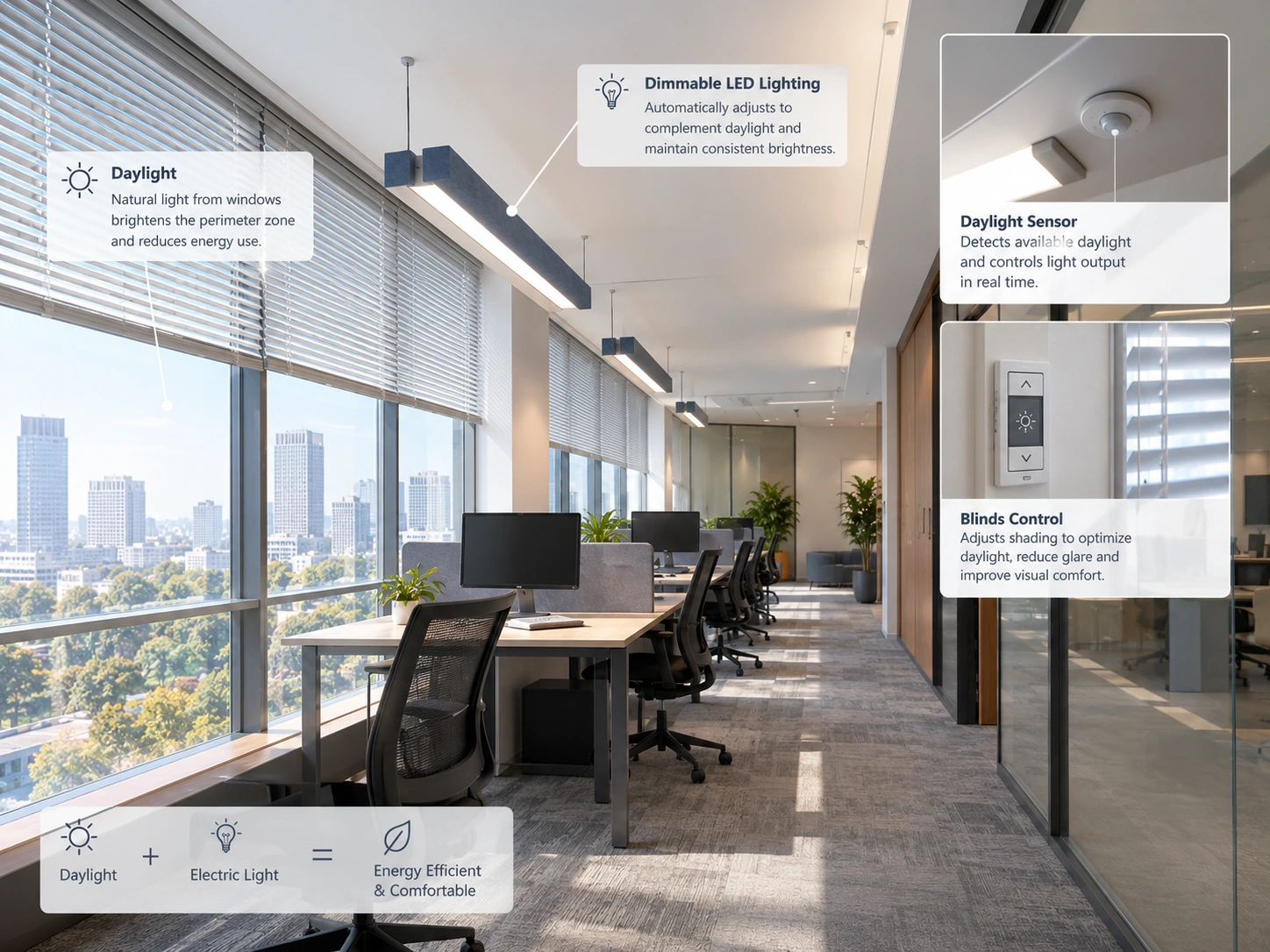
Perimeter daylight zones should be planned as separate office lighting control areas. Desks near windows receive changing daylight levels, while interior workstations depend more heavily on electric lighting. Separate zoning allows perimeter luminaires to respond to daylight without reducing useful output in deeper floor areas.
Daylight dimming should reduce electric output while preserving task illuminance. Photosensors can adjust perimeter luminaires as daylight changes during the day. The control sequence should avoid abrupt transitions, maintain visual comfort, and coordinate dimming with window brightness, screen position, and the maintained illuminance target.
Occupancy sensors should support energy control without disrupting office work. Presence detection can switch or dim luminaires in meeting rooms, circulation areas, and intermittently occupied zones. Sensor placement, time delays, coverage, and manual override settings should reflect actual movement patterns and the risk of false vacancy detection.
Control zoning should match office activities, daylight exposure, and maintenance requirements. DALI is a digital, bidirectional control protocol specified through the IEC 62386 standard series, while 0–10V is an analogue control interface that normally provides a one-way output request. European projects may also use 1–10V, which should not be assumed identical to 0–10V.
How Should Designers Plan Lighting for Offices With Limited Daylight Access?
Offices with limited daylight access need a deliberate electric-lighting strategy based on task requirements, visual comfort, and controllability. Interior zones should not be treated as permanent low-priority areas simply because perimeter daylight is unavailable.
The design should review:
· Maintained illuminance for workstations and shared tasks
· Vertical illumination on faces, walls, and presentation surfaces
· Low-glare distributions for long-duration screen work
· Independent control zones for workstations, meeting rooms, and circulation
· Occupancy and scheduling logic for spaces with intermittent use
· Surface reflectance and ceiling brightness in deep-plan areas
· Emergency-lighting coordination and maintenance access
For simple group dimming, an analogue interface may be sufficient. Offices requiring individual addressing, scene control, occupancy or daylight integration, status feedback, and fault reporting may benefit from DALI-based control. The correct choice depends on the control sequence, wiring design, compatibility requirements, and project budget, not on a universal ranking between DALI and 0–10V.
How Should CCT, CRI, and Office Interior Design Work Together?
How Should CCT Follow the Design Intent?
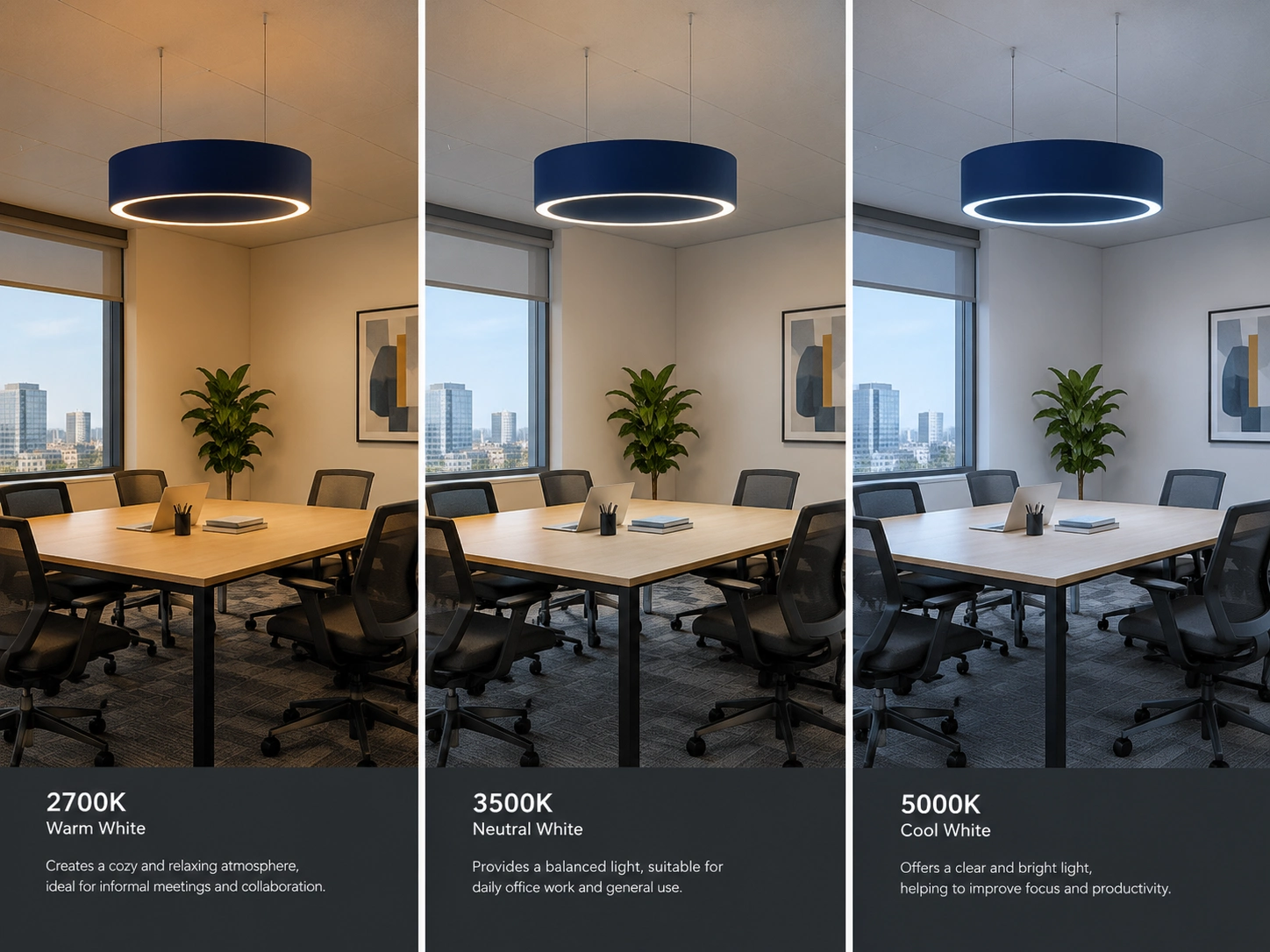
Correlated colour temperature (CCT) describes the apparent colour of light in kelvin (K), not the physical temperature of a luminaire. Lower CCT usually appears warmer and more amber, while higher CCT appears cooler and more bluish.
Approximate design language includes:
- 2700–3000 K: warm or amber-white; reception areas, lounges, and relaxed settings
- 3500–4000 K: neutral to cool white; general offices and task areas
- 5000 K and above: cool, daylight-like white; selected daylight-simulation or industrial contexts
These ranges describe common visual conventions, not fixed physiological categories. CCT selection should respond to daylight availability, surface finishes, user preference, time of day, control strategy, and the intended atmosphere. A fixed 4000 K specification is not automatically suitable for every office zone.
What Does Evidence Actually Support About CCT, Blue Light, and Alertness?
CCT alone cannot predict the biological effect of office lighting. Two light sources with the same CCT may have different spectral power distributions and different effects on the eye’s non-visual photoreceptors, including intrinsically photosensitive retinal ganglion cells (ipRGCs).
Research suggests that blue-enriched light may relate to daytime alertness under specific conditions, but higher CCT does not always improve productivity. Relevant variables include:
- Spectral power distribution
- Illuminance at the eye
- Exposure timing and duration
- User age, activity, and surrounding conditions
- Melanopic Equivalent Daylight Illuminance (melanopic EDI)
For office lighting, CCT should primarily shape perceived atmosphere. Melanopic EDI provides a more precise metric when non-visual light effects require evaluation, while CCT alone cannot support a reliable productivity or alertness claim.
Why Does Colour Rendering Matter for People and Materials?
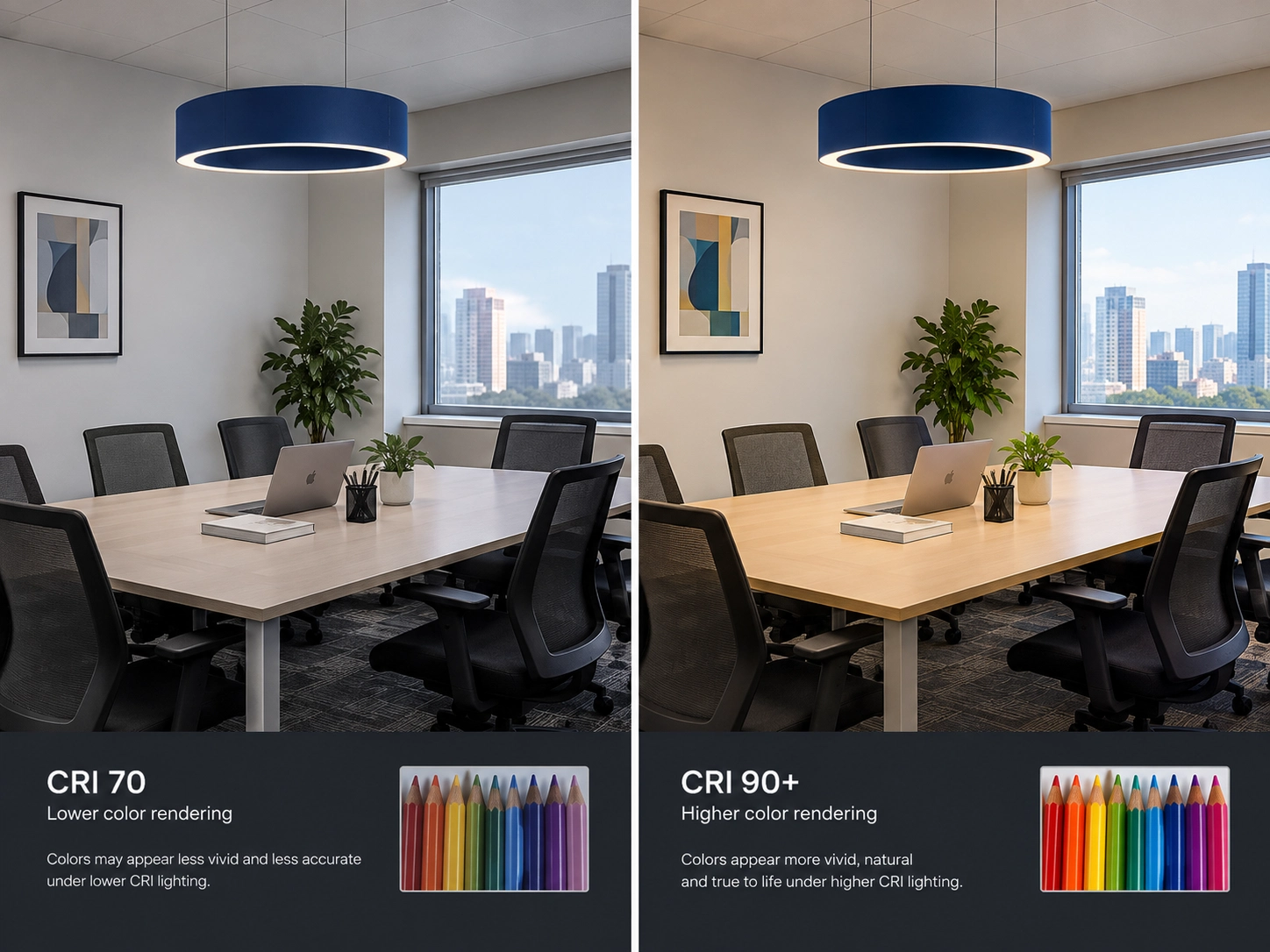
Colour rendering affects how employees perceive materials, finishes, documents, skin tones, and displayed products. EN 12464-1:2021 specifies a minimum colour rendering index of Ra ≥ 80 for ordinary office work, including writing, typing, reading, and data processing.
Ra ≥ 90 may be appropriate where colour discrimination or natural appearance carries greater project importance, such as:
- Design studios
- Material-selection areas
- Presentation rooms
- Brand-sensitive interiors
- Video-call backgrounds and facial presentation
CRI alone is not a complete colour-quality description. For colour-critical applications, TM-30 metrics such as Rf for fidelity and Rg for gamut can provide additional information. A high CRI value does not guarantee that every colour will appear vivid, neutral, or equally natural to every observer.
Adjacent office lighting should maintain a visually consistent colour appearance across connected zones. Large differences in CCT, colour rendering, or spectral character can make corridors, workstations, meeting rooms, and reception areas appear disconnected. Designers should compare neighbouring luminaires under actual finishes, daylight conditions, and control scenes before final specification.
Why Is the Office Ceiling More Than a Lighting Surface?
Office lighting competes with HVAC diffusers, sprinklers, sensors, speakers, cable routes, and structural elements above the ceiling. A fixture grid that ignores these services can create blocked apertures, uneven spacing, maintenance conflicts, and poor alignment with workstations. Reflected ceiling plan coordination must begin before luminaire positions are fixed.
Acoustic treatment uses the same ceiling real estate as office luminaires. Baffles, clouds, panels, and suspended fixtures can compete for height, sightlines, suspension points, and service access. Open-plan offices therefore require a coordinated ceiling strategy that protects both visual performance and the intended acoustic treatment.
How Should Designers Coordinate Office Lighting and Acoustics at the RCP Stage?
The reflected ceiling plan (RCP) should coordinate luminaires, acoustic elements, building services, and furniture geometry as one documented layout. Early coordination reduces late relocations that can weaken illuminance, glare control, acoustic coverage, or maintenance access.
The RCP review should verify:
- Luminaire alignment with workstation rows and meeting tables
- Clearances around HVAC diffusers, sprinklers, detectors, and speakers
- Suspension heights for pendants, acoustic clouds, and baffles
- Access to drivers, control gear, and serviceable components
- Daylight and electric-lighting control zones
- Acoustic coverage in focus, collaboration, and meeting areas
- Visual balance between luminous surfaces and ceiling finishes
Design teams should compare the trade-offs between integrated and separate acoustic ceiling strategies (Acoustic Ceiling Lighting vs Separate Lighting and Acoustic Panels) before selecting a final ceiling arrangement. The objective is not to maximize fixture density or acoustic product coverage, but to maintain the required lighting performance while preserving practical acoustic and service coordination.
How Can Office Lighting and Acoustics Together Support Productivity and Wellbeing?
Poor office lighting can reduce concentration and increase fatigue over the workday, while unmanaged acoustic conditions may compound the same workplace cost. A growing body of workplace-environment research suggests that visual comfort and acoustic comfort are interconnected components of indoor environmental quality (IEQ), with higher satisfaction associated with lower reported stress and better perceived work outcomes. Harder, more open ceiling finishes can intensify both design challenges, so project teams increasingly consider lighting and acoustics at the same planning stage. This does not mean acoustic lighting is automatically superior to separate treatment; the appropriate strategy depends on zone overlap, ceiling coordination, and project requirements. Learn why more offices are adopting acoustic lighting as a design strategy.
When Does Acoustic Lighting Make Sense in an Office?
Acoustic lighting makes sense when one ceiling element can address a genuine overlap between lighting and acoustic requirements. The product should solve a coordination problem without compromising illuminance, glare control, maintenance access, or acoustic performance.
- When lighting and acoustic zones overlap. Open-plan focus areas, collaboration zones, and meeting areas may need both controlled illumination and localized sound absorption. An integrated luminaire can align with the activity zone when the acoustic coverage and photometric distribution are both suitable.
- When the ceiling is visually congested. HVAC diffusers, sprinklers, sensors, cable routes, luminaires, clouds, and baffles can overcrowd a reflected ceiling plan. Combining selected lighting and acoustic functions may reduce visual clutter and simplify suspension coordination.
- When suspended lighting is already part of the design. Suspended linear fixtures, pendants, and decorative office luminaires already occupy the ceiling volume. An acoustic lighting element may provide a coherent visual rhythm when suspension height, fixture spacing, service access, and light distribution remain appropriate.
- When localized absorption is useful. Meeting rooms, collaboration tables, and concentrated work zones may need absorption close to the source of speech or activity. A panel, baffle, cloud, or integrated acoustic luminaire can support local treatment without applying the same acoustic solution across the entire office.
Acoustic lighting is not automatically better than separate acoustic treatment. The decision should compare acoustic absorption, lighting performance, ceiling geometry, maintenance, cost, and future flexibility. Designers should review the full range of acoustic ceiling solutions — including panels, clouds, baffles and lighting (Types of Acoustic Ceiling Solutions: Panels, Clouds, Baffles & Lighting Explained) before selecting an integrated product.
What Forms of Acoustic Lighting Suit Different Office Zones?
Acoustic lighting should be selected according to the activity, furniture geometry, ceiling height, and required sound absorption in each office zone. The same luminaire form will not suit workstation rows, meeting tables, lounge seating, and high open ceilings equally well.
| Office zone | Possible acoustic lighting form | Design logic |
| Workstations | Linear acoustic lighting | Align with desk rows and support continuous task areas |
| Collaboration areas | Acoustic panel or baffle with lighting | Define the activity zone and provide localized absorption |
| Meeting rooms | Acoustic panel or pendant | Relate the lighting element to the meeting table and participant positions |
| Lounge areas | Acoustic dome, ring, or shade | Create decorative zoning with a softer visual character |
| High or open ceilings | low-glare acoustic baffle light | Establish a suspended rhythm while managing reverberation and service coordination |
In meeting rooms, the lighting form should support facial illumination, table visibility, display use, and scene control while the acoustic element addresses speech reflection. Designers should also consider improving acoustics specifically in meeting rooms when selecting the integrated arrangement. Acoustic lighting remains a zone-specific option, not a universal replacement for every ceiling treatment.
Should Office Lighting and Acoustic Treatment Be Integrated or Separate?

The decision should follow the overlap between lighting zones, acoustic requirements, ceiling geometry, maintenance access, and future flexibility. No single arrangement is correct for every commercial office.
- Separate systems: Choose independent luminaires and acoustic panels, clouds, or baffles when lighting and acoustic zones differ, when each system needs independent replacement, or when ceiling services require maximum flexibility. Separate treatment also allows lighting optics and acoustic absorption to be specified without compromise.
- Integrated systems: Choose acoustic luminaires when the same suspended element can provide suitable photometric performance and localized absorption within the same activity zone. Verify maintained illuminance, glare control, acoustic performance, suspension capacity, driver access, and product compatibility before specification.
- Hybrid systems: Combine integrated acoustic lighting with separate panels, clouds, or baffles when some zones have overlapping requirements and others do not. This approach can place acoustic luminaires above workstations or meeting tables while using independent treatment in circulation, lounge, or high-reverberation areas.
The practical decision logic is simple: use separate systems when requirements diverge, integrated systems when requirements genuinely overlap, and hybrid systems when the office contains both conditions. Acoustic lighting should remain a coordinated option rather than an automatic default.
What Is a Practical Office Lighting Design Workflow?
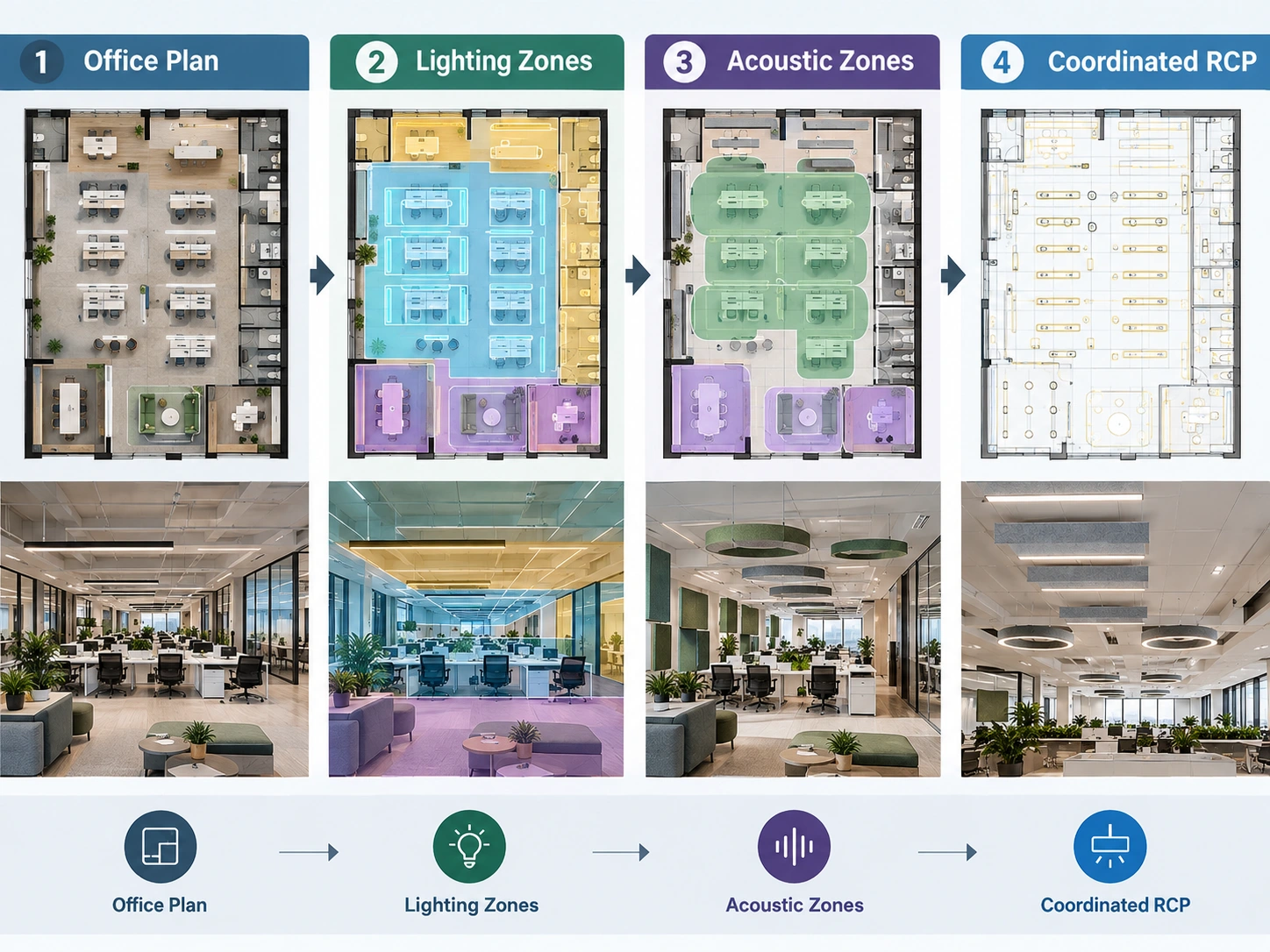
A reliable office lighting workflow moves from user activities and furniture geometry to measurable performance, ceiling coordination, and final system selection. The sequence reduces redesign risk and keeps lighting decisions connected to the actual workplace.
1. Step 1 — Map Office Activities. Identify focus work, collaboration, meetings, circulation, reception, lounge use, and occasional tasks before selecting fixture types.
2. Step 2 — Fix Furniture and Workstation Geometry. Confirm desk rows, monitor orientations, meeting tables, partitions, screens, whiteboards, and circulation paths so luminaire positions respond to real task locations.
3. Step 3 — Define Lighting Requirements. Establish maintained illuminance, uniformity, UGR limits, colour rendering, vertical illumination, task priorities, and applicable standards for each office zone.
4. Step 4 — Review Daylight and Controls. Map perimeter daylight, photosensor zones, occupancy detection, dimming sequences, scene control, manual overrides, and the selected control interface.
5. Step 5 — Check Glare and Distribution. Test luminaire luminance, beam distribution, monitor reflections, window brightness, observer viewpoints, direct or indirect output, and transitions between adjacent zones.
6. Step 6 — Overlay Ceiling Services. Coordinate luminaires with HVAC diffusers, sprinklers, detectors, speakers, cable routes, structural elements, suspension points, and maintenance access on the reflected ceiling plan.
7. Step 7 — Review Acoustic Requirements. Identify areas needing absorption, speech control, or localized treatment, then assess how to calculate the right quantity of acoustic lighting for your space.
8. Step 8 — Decide Separate, Integrated, or Hybrid Ceiling Strategy. Select separate luminaires and acoustic elements when requirements diverge, integrated products when zones genuinely overlap, or a hybrid arrangement when the office contains both conditions.
FAQ
Conclusion
This guide to office lighting design followed the full decision chain from task illuminance and glare control to daylight integration, furniture geometry, controls, and reflected ceiling plan coordination. Effective design starts with how people use each space, then translates those activities into measurable lighting requirements and coordinated ceiling layouts.
Acoustic lighting becomes a valuable integrated option only when a lighting zone and an acoustic zone genuinely overlap. Separate panels, clouds, baffles, and luminaires may remain more suitable when acoustic coverage, lighting distribution, maintenance, or future flexibility require independent systems. Acoustic lighting is not automatically best; the correct choice depends on people, tasks, space, and verified project performance.
Reference
[1] European Committee for Standardization.
EN 12464-1:2021, Light and lighting — Lighting of work places —
Part 1: Indoor work places.
Brussels: CEN; 2021.
[2] International Commission on Illumination (CIE).
CIE 117:1995, Discomfort Glare in Interior Lighting.
Vienna: CIE; 1995.
doi:10.25039/TR.117.1995.
Written by Ariel Yang
Content & Product Specialist
Technical Review by Richard Liang
LED Signage Product & Process Manager
Email: info@signliteled.com